
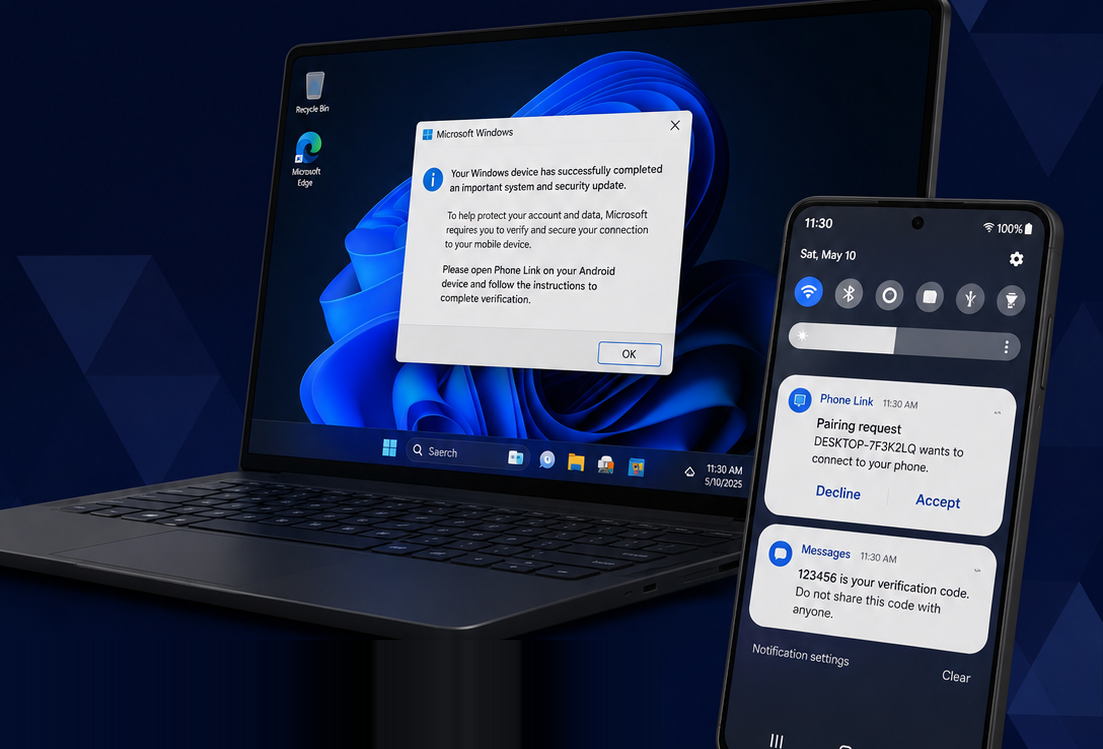
The MFA code was valid. The person using it wasn’t.
The account takeover that leaves no trace
Some fraud cases just don’t – or won’t – add up.
A customer swears they never authorized a transaction. But the logs tell a different story: a valid session, the correct password, and a correctly entered multi-factor authentication (MFA) code. There’s no phishing link in the email logs, no SIM swap on record, no password reuse from a known breach.
Both stories can’t be true. Or can they? The money is long gone, after all.
If you’ve worked an account takeover (ATO) case like this one that behaves in every measurable way like the legitimate customer – you’re not looking at a failure of your controls. You’re looking at a technique built specifically to pass them
TL;DR: Your MFA didn’t fail – someone else was watching it
The attack in this case is called Phone Link hijacking, and the unsettling part is how ordinary the tool behind it is.
Microsoft Phone Link is a legitimate, useful feature that ships preinstalled on Windows 11. Its job is mundane – syncing a phone’s texts, calls, and notifications to a desktop so you can see them on your computer – and millions of people use it exactly as intended.
But if an attacker has already compromised a victim’s PC, that convenience becomes a live surveillance feed. Incoming texts – including the SMS-based MFA codes their bank sends – appear on a machine the attacker controls. They read each code as it arrives, at the same moment the customer does.
From the bank’s side, nothing looks wrong. The code went to the right phone number, was entered correctly, and the session carried the right credentials. Authentication worked precisely as designed – for the wrong person.
And that’s why these cases don’t add up: the attacker isn’t defeating MFA. They’re essentially standing beside the victim while it works.
Why a standard investigation misses it
Traditionally, ATO investigations start by looking for the usual points of failure. But Phone Link hijacking doesn’t leave any of them.
- No phishing link. The victim was never tricked into entering credentials on a fake site.
- No SIM swap. The phone number was never ported; the real device kept receiving texts normally.
- No credential-stuffing pattern. The login used the correct password from a plausible context.
- No impossible travel or obviously bad device signals. in many cases, because the activity can originate from the victim’s own compromised machine.
This technique is effective precisely because it produces almost no evidence. By the time the fraud surfaces — usually when the customer notices a transfer they didn’t make – the money has moved. Account takeover fraud rose 36% year over year in 2024, and resolving a single ATO investigation takes an estimated 10 to 20 days on average. And that clock only starts when someone realizes there’s something to investigate.
A real case: “No idea how they did it”
Over Memorial Day weekend in 2025, a Bank of America customer posted publicly about a fraud he couldn’t explain – and worked out what happened before his bank could.
On a Sunday, he received a text with a secured transfer code he hadn’t requested. Assuming it was a scam, he changed his password. It wasn’t a scam: a large wire transfer had already left his account, and over the holiday weekend he didn’t see it until the banks reopened two days later. His bank opened an investigation and told him to expect an answer in 10 to 90 days.
Then he pieced together the part that matters: his phone was linked to his laptop through Microsoft Phone Link, so every text he received – including his verification codes – was visible on his computer. And his laptop had flagged something days earlier: its antivirus had detected a password-stealing tool. An attacker with access to that laptop could read his password, see the code verifying a new-device login, initiate the transfer, and read the final code to authorize it – every step, using authentication that behaved exactly as designed.
The important detail for any fraud team: The bank’s investigation didn’t uncover the method. the victim did, and handed it to them. The institution’s systems saw a clean, authenticated session. The answer lived on the customer’s own devices, in a feature no one thought to ask about.
How to tell if this is your case
You can’t confirm Phone Link hijacking from transaction logs alone, but there are signals that should move it up your list of suspects. If a disputed case shows several of these together, it’s worth pursuing:
- The customer is credible and consistent: They insist the transaction wasn’t theirs, and nothing about their history suggests first-party fraud.
- Authentication “passed” cleanly: Correct password, correct MFA code, no failed attempts – the session looks too clean for a stranger.
- None of the usual entry points are present: No phishing report, no SIM swap, no known credential breach tied to the customer.
- The customer uses a Windows PC: They may mention their phone is “connected to” or “synced with” their computer.
- There may be a malware indicator on the customer’s PC: An antivirus detection around the time of the incident, especially anything related to credential or password theft.
The single most useful question to ask a customer whose case fits this pattern is one most fraud teams have never had a reason to ask:
“Is your phone linked to your computer through Microsoft Phone Link?”
If the answer is yes, you may have found the missing piece your logs couldn’t show you.
What actually closes the gap
Recognizing the technique is one thing; shutting it down is another. At a high level: stop relying on SMS as a security signal and move high-risk actions to phishing-resistant methods; deliver critical alerts out of band, through a channel the attacker isn’t mirroring; and treat phone-to-PC syncing as a risk surface, with the Phone Link question above as standard ATO triage.
The full detection guidance – the complete red-flag list, the step-by-step mechanics, and the controls that close the gap on both the institution and customer side – is where the depth lives.
A deeper dive
Q6 Cyber identified this technique the way we identify most emerging fraud tactics: by operating inside the criminal forums and channels where fraudsters build, refine, and sell their tools – months before those tools reach an analyst’s case list. Phone Link hijacking is being discussed and sold in those channels right now.
Our full report, From Zero-Click to Full Access: How Phone Link Hijacking Renders SMS MFA Obsolete, breaks down exactly how the attack works, how to spot it in the wild, and how to close the gap before it becomes another dispute you can’t explain.
Every trusted tool eventually gets discovered and repurposed by someone watching for the gap. Our job is to be in those channels first – so you hear about the next one before it reaches your fraud queue, not after.