
How to tell the difference between Mark from IT and “Mark from IT”
Your customer says Mark from IT told them to do it. You don’t have a Mark in IT. This case file collects the findings from October on how “Mark” gets the code, the access, and the money, what he has to buy to make fraud happen, and how to tell him apart from the real thing.
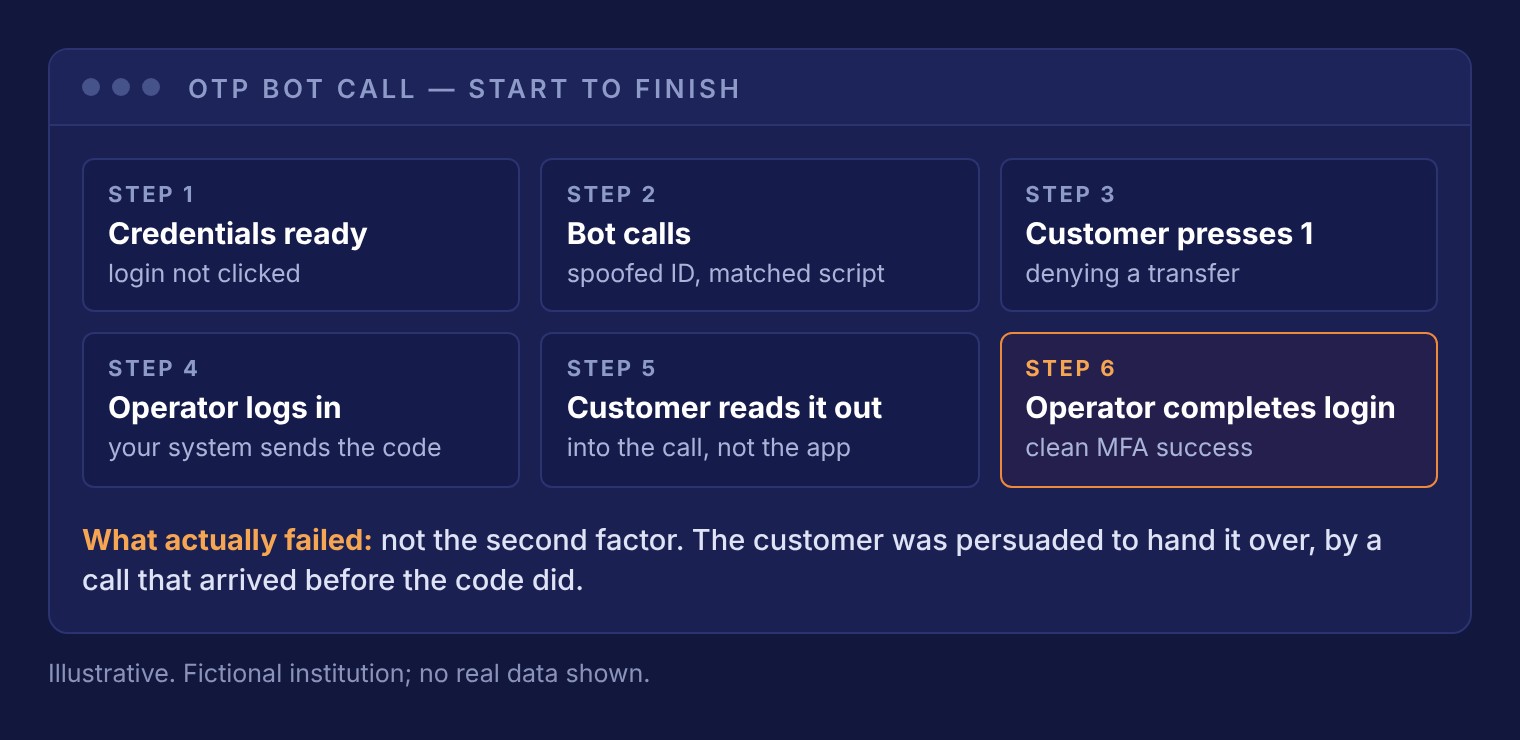
The bot persuades the customer to read a code over the phone.
The operator already has the customer’s username and password, stolen somewhere else. The OTP (one-time passcode) bot calls with your institution’s name on caller ID and tells the customer to press 1 if they didn’t make a transfer. That keypress is the cue. The operator logs in, your system sends a real code, and the customer reads it into the call. The fraudster, who’s watching this whole exchange, then enters the code and completes the login.
From your side, it is a clean MFA success. When one customer mistyped the code, the bot kept them on the line and walked them through entering it again.
The service is sold openly on Telegram for $60 a week, $130 a month, or $600 for lifetime access.
How to spot him
- A one-time code entry that fails or lags, then succeeds.
- Customers reporting a “call from the bank” about a transfer they didn’t make.
- Credentials for the account already circulating before the login attempt.
What to do
- Put the warning in the text that carries the code: “We will never call you about this code.”
- Offer an authenticator app or passkey to high-risk customers. There is nothing for a caller to ask them to read out.
- Extend out-of-band verification to new payees and large wires, not just logins.
The call works because it explains what the customer already noticed.
The most dangerous call is often the one that confirms someone’s suspicions.
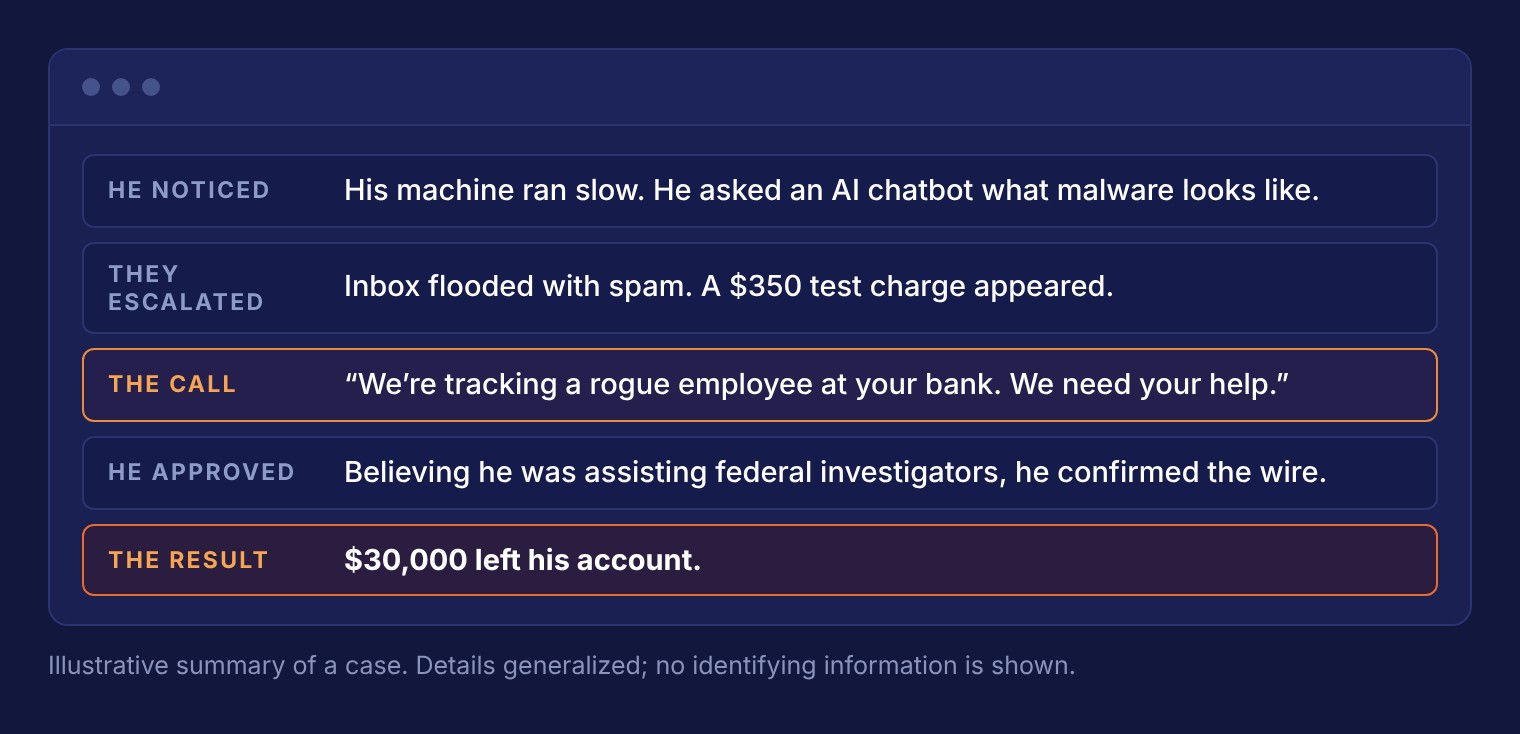
In one case from our October 6 webinar, a small business owner’s computer was running slowly, so he asked an AI chatbot what a computer infected with malware looks like. The fraudster was watching his screen remotely and immediately flooded his inbox with spam and placed a $350 test charge on his account. Then his phone rang. The caller said they were tracking a rogue employee at his bank and needed him to approve a wire transfer to catch them. He thought he was helping federal investigators, so he complied and $30,000 left his account. The caller had promised it would be returned. It wasn’t.
He was suspicious, but he still approved the transfer because the call explained what he had noticed. The tools behind this scam are cheap: spoofing vendors sell any caller ID, plus a “helpdesk pack” with ticket formats, hold music, and a callback line so the victim can “verify” the caller.
How to spot him
- A caller who explains a problem the customer already noticed, then asks for an action.
- A request to approve, test, or “cancel” a transaction to help catch someone.
- A callback number, ticket number, or “direct line” that the caller supplies.
- Caller ID that looks right. It proves nothing.
What to do
- Tell customers early: “We will never ask you to approve a transaction or read a code to help us investigate.”
- Warn on the new-payee screen and the wire approval screen.
- Verify only through numbers and tickets from your own records.
“Mark” uses the customer’s own device against them.
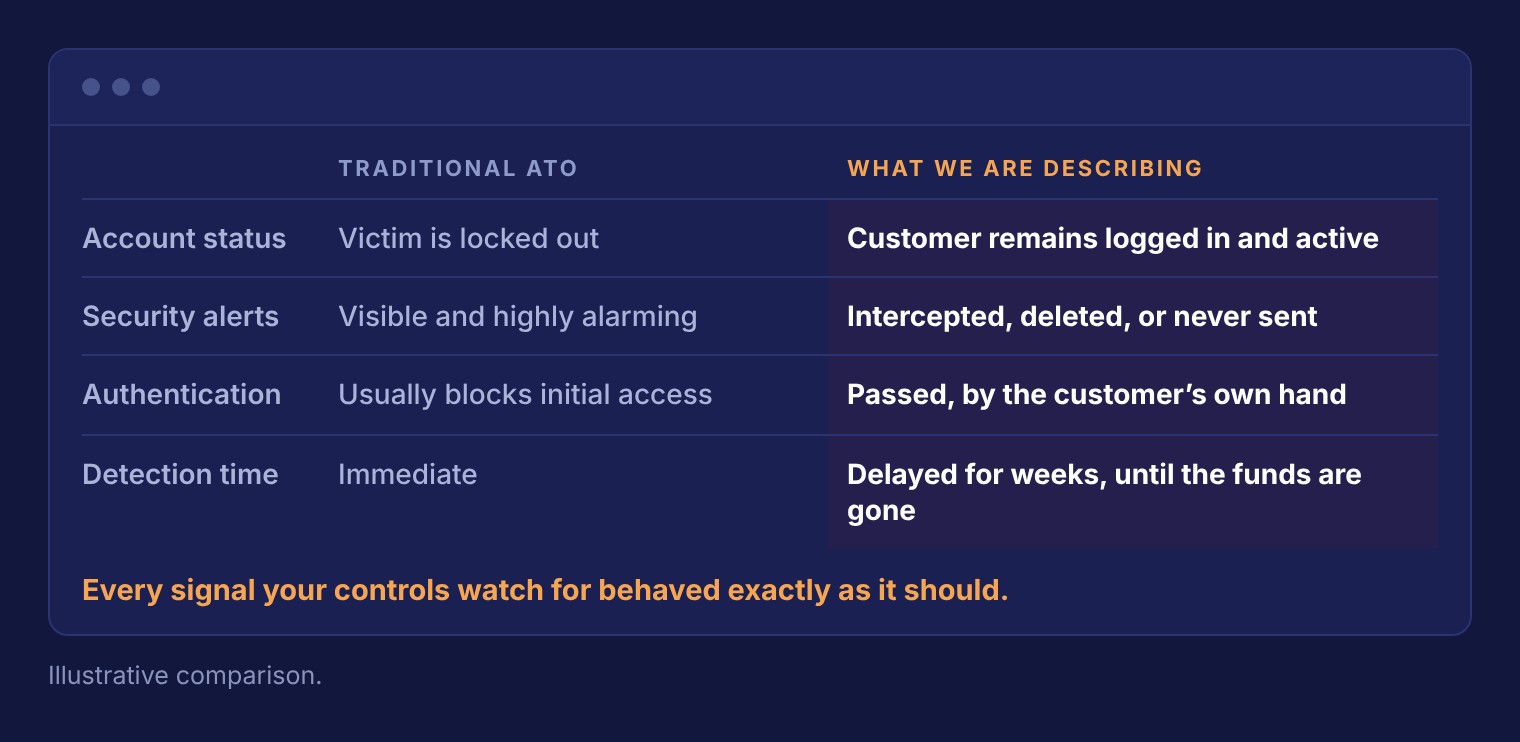
hVNC (hidden virtual network computing) is malware that creates a hidden second desktop on the victim’s machine. The customer works normally while the fraudster controls the hidden session. Anything the fraudster does comes from the same device, the same IP address, and the same fingerprint. The customer is not locked out, alerts are intercepted or deleted, and authentication passes from the genuine device.
In one case, a business account was drained in a series of $30,000 transfers, sized to look ordinary and sent to mule accounts, several of which were at the same bank. The fraudster created mailbox rules first, so the customer never saw the confirmations. Detecting this kind of account takeover (ATO) can take weeks, and because large transfers are normal for businesses, models tuned on retail volume do not see it.
How to spot him
- Several new payees registered in a short window, especially at the same destination bank.
- Transfers sized below review thresholds and spaced across the day.
- First-time payroll changes, new employees, or loan draws arriving through a connected platform.
What to do
- Monitor business accounts separately from retail.
- Extend out-of-band verification to every high-risk action, not just the login.
- Give first-time activity through embedded financial products less tolerance, not more trust.
The legitimate tool becomes the compromise.
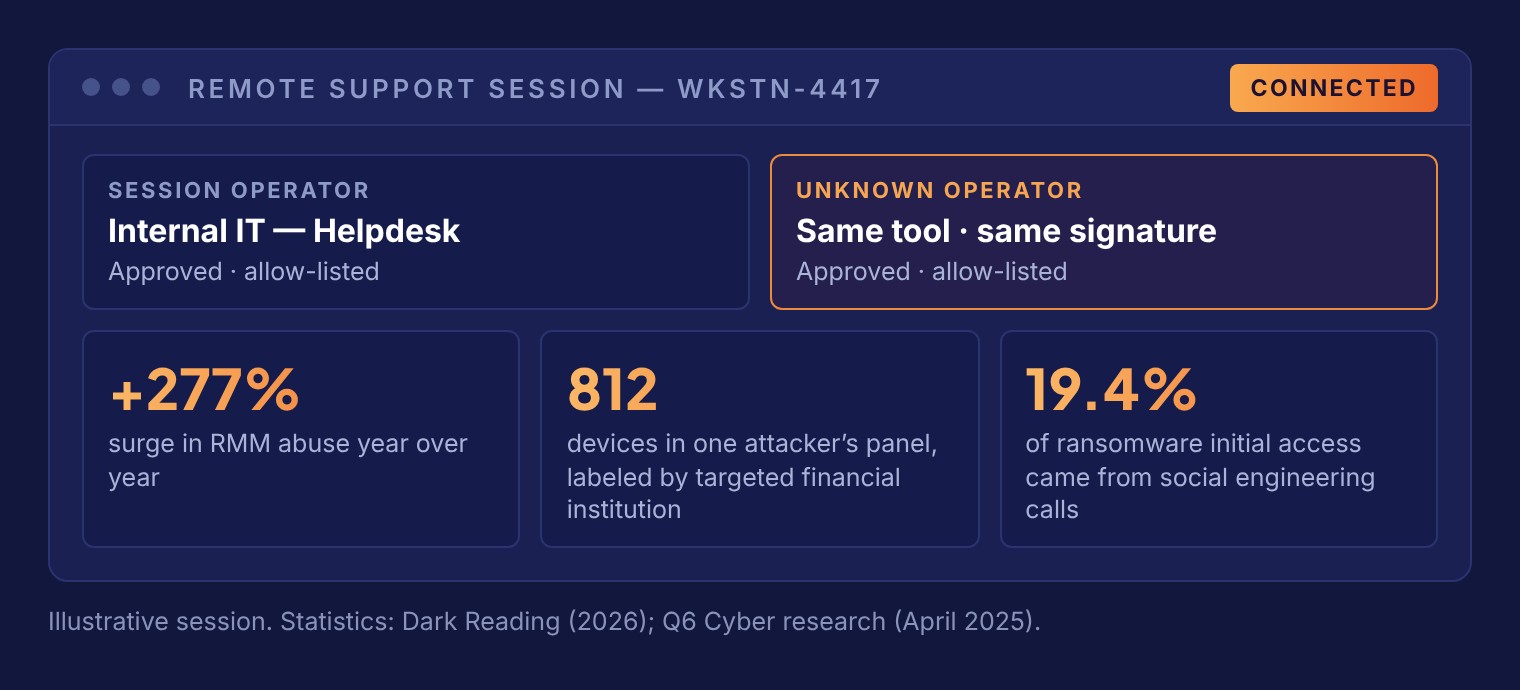
“Hi, this is Mark from IT. We’ve flagged unusual activity on your workstation.” The caller walks the customer through installing a real, digitally signed remote monitoring and management (RMM) tool that nothing blocks. The call ends, but the session stays open.
RMM abuse is up 277% year over year. One attacker’s ConnectWise panel held 812 devices, labeled by the targeted financial institution. Social engineering calls were the initial access vector in 19.4% of the ransomware operations in Q6 Cyber’s April 2025 study. Your controls look for malware, so these attacks use legitimate software instead.
Some versions skip the call. A fake “Verify you are human” on-screen prompt tells the user to press Win+R and paste a command, and the user installs the tool themselves.
How to spot him
- A customer or employee who says “IT” or “the bank” asked them to install software, connect to their device, or paste a command.
- A fake CAPTCHA that tells someone to press Win+R and paste.
What to do
- Remove local admin rights so only IT can install software on employee devices.
- Repeat one rule everywhere: “We will never ask you to install software, connect to your device, or paste a command.”
- Warn on the login page and the new-payee screen. Send every support request back to a number the customer already knows.
“Mark” buys everything he needs on the Dark Web.
The credentials were stolen somewhere else, the call hasn’t been placed yet, and the login is on hold. The fraudster’s preparation happens long before your institution sees anything.
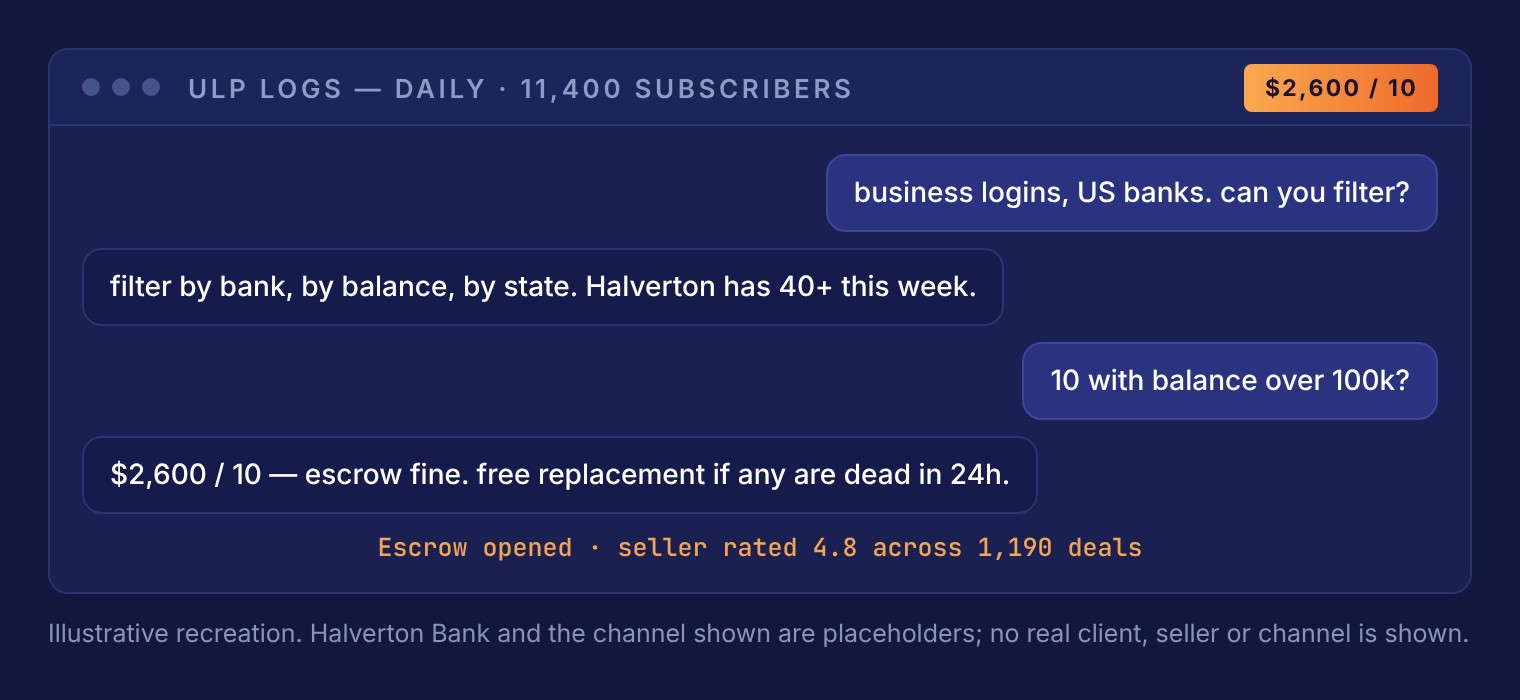
In listings our analysts found, a log vendor (a seller of stolen login data) lets buyers filter business logins by bank, balance, and state. The sample request is 10 accounts over $100K for $2,600, with a free replacement for any that stop working within 24 hours. An access broker lists a persistent remote session on a corporate workstation, with saved banking credentials, for about $900. A business login with online access and a 2FA bypass is listed at $3,800 for a $212,400 balance.
How to spot him
- Login attempts clustered by balance tier, geography, or business type.
- Your own customers’ credentials appearing in underground listings.
What to do
- Get a feed of your customers’ compromised credentials tied to your online banking program, and use it for preemptive resets, step-up verification, or monitoring.
How to spot “Mark from IT”
The tells from all five findings, grouped by where your team will see them.
He says
- Explains a problem the customer already noticed.
- Supplies the callback number, ticket number, or direct line.
- Asks to approve, test, or cancel a transaction to help catch someone.
- Asks for a one-time code.
- Asks to install software, connect to the device, or paste a command.
- Pushes urgency: “It’ll take two minutes.”
The account shows
- A code entry that fails or lags, then succeeds.
- Several new payees in a short window, often at the same bank.
- Transfers sized below review thresholds and spaced across the day.
- First-time payroll changes, new employees, or loan draws through a connected platform.
- Login attempts clustered by balance tier, geography, or business type.
The market shows
- Your customers’ credentials, for sale or in a log.
- Your institution’s name in a vendor’s filter list.
- Remote access to a workstation with saved banking credentials.
Where does your institution stand?
Check the controls you already have in place to see how your institution stacks up.
Some moments stay out of reach.
Nothing here detects the call while it is happening, and nothing stops a customer who decides to hand over a code or let someone connect to their device. Education reaches the person, controls reach the action, and intelligence reaches what happens before either.
Anyone who tells you otherwise is selling you something.